
My private pet

Organizational pet
Your country sets the currency of prices and payments and where Findpet ID tags are shipped.
Other country? Choose USA: prices in USD.
The site language is changed separately, with the globe button.


Our partner, Pet Insurance Quotes, is a free-to-use pet health insurance marketplace that helps you compare top-rated providers all in one place, so you can find the right plan in minutes.
One account for findpet.com and the Findpet app.
Enter your password to sign in.
Choose a password. Next, you'll add how finders can reach you.
By creating an account, you agree to Findpet's Terms of Use and Privacy Policy.
We'll email you a link to set a new password.
Set a password to sign in with your email. If you signed up with Google or Facebook, you can use that button instead.
Not in your inbox? Check Spam or Promotions.
One account for findpet.com and the Findpet app.
Can’t get texts?
Only accounts where this number is confirmed are listed. Want one number per account? Remove it in the other account’s profile.
Create a free account with it — it takes your name and e-mail.
Already have an account with an e-mail? and confirm this number in your profile — next time it signs you in. A number typed in a profile but never confirmed doesn’t sign in, so nobody gets into an account by someone else’s typo.
By creating an account, you agree to Findpet’s Terms of Use and Privacy Policy. Msg frequency varies. Msg & data rates may apply. Reply STOP to stop, HELP for help.
Not you? This number was confirmed on that account.
You just proved the number is yours with the code. The other account keeps its pets and e-mail, gets an e-mail about the change, and signs in with e-mail from now on.
You chose Hide My Email. Apple forwards our emails to you.
So a shelter or vet can reach you when your pet is found.
Didn't get the text? You can add your pet now and confirm the number next time.
Register a microchip, activate a Findpet ID tag and keep your contacts current.
Open the address on the microchip registration card and type the short code from the back.
Use the microchip number (9, 10 or 15 letters and digits) from the vet or the adoption papers.
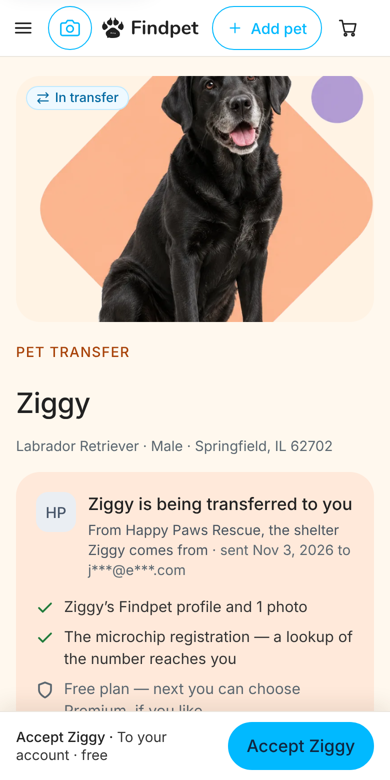
If a shelter, store or vet registered the pet for you, accept the transfer from the e-mail or text.
Microchip lookup shows whether a microchip is registered on Findpet.
If you have the microchip registration card from the box, open the address on the card and type the short code. Otherwise add your pet with the 15-digit microchip number. Registration is free for life.
A free search by the American Animal Hospital Association that shows which registries know a microchip number. Findpet takes part, so vets and shelters find Findpet-registered pets through it. It doesn’t store contacts — the finder is sent to Findpet.
No. A microchip has no battery or GPS; it only holds a number that a scanner reads. For location, use a Findpet ID tag: when someone scans it, you get the approximate location of the scan, and the exact place if the finder shares it.
Thanks! Glad it helped.
Scan the QR code on the tag or type its ID, then choose the pet.
The tag opens your pet’s page with a button to message or call you.
Order a replacement — the new tag links to the same profile.
Findpet recognizes pets by photo. Pets change as they grow, so update photos once a year for adult pets and every 6 months for puppies and kittens.
No. Any phone camera reads the QR code; tags with NFC also work with a tap. Nothing to charge.
Thanks! Glad it helped.
Our team answers in the chat, usually within a few minutes. Found a pet and can’t reach anyone? Call or text our hotline.
Loading…
We could not load this right now. Please try again in a moment.
The flyer is made from your pet’s lost report — sign in and pick the pet.
A replacement tag links to the same pet profile — sign in and pick the pet.
We show the transfers sent to the e-mail of your account.
After you sign in, this window opens again. New to Findpet? The same window creates a free account.
A flyer has a QR code to the pet’s lost report.
Pets that are at home are not listed: report a pet lost first — the flyer comes with the report.
None of your pets is reported lost. Post a free lost report — the flyer with a QR code is made from it in one tap.
Report a lost pet See an example flyer (PDF)Found a pet? A found report gets a flyer too.
The new tag has a new code and opens the same pet profile; the lost tag stops working.
Pets without a tag are not listed. Get a Findpet ID tag
This pet is on the Free plan. A free replacement tag comes with Premium — or buy a new tag; both open the same pet profile.
Buy a new tagTransfers sent to the e-mail of your account.
Accepted transfers are in My pets.
We didn’t find a transfer for the e-mail of your account.
An example with a sample pet — this is the page the new family opens from the e-mail or text.